For those who aren't familiar with Kate Beaton's work, you're missing out! If you've ever wondered what figures such as Jane Austen, F. Scott Fitzgerald, or Sherlock Holmes would be like in comic form, here's your answer!
Beaton makes smart little pieces that usually get a laugh out of me (and quite a lot of others too).
 |
| Linked from The Mary Sue |
I get a lot of the literary, science, and pop culture references, but not a lot of the history ones. And even though I'm not a history buff, it's not a problem because Beaton always provides a little note/entry for each comic post in which she often explains the origin of the joke (Clearly, history was not my strong point in school).
Here are some of my favorites (I've also included links to the original comics below each strip in case you want to read her own notes about the strip. I highly recommend it for context and humor!).
  |
| See annotation here below the comic |
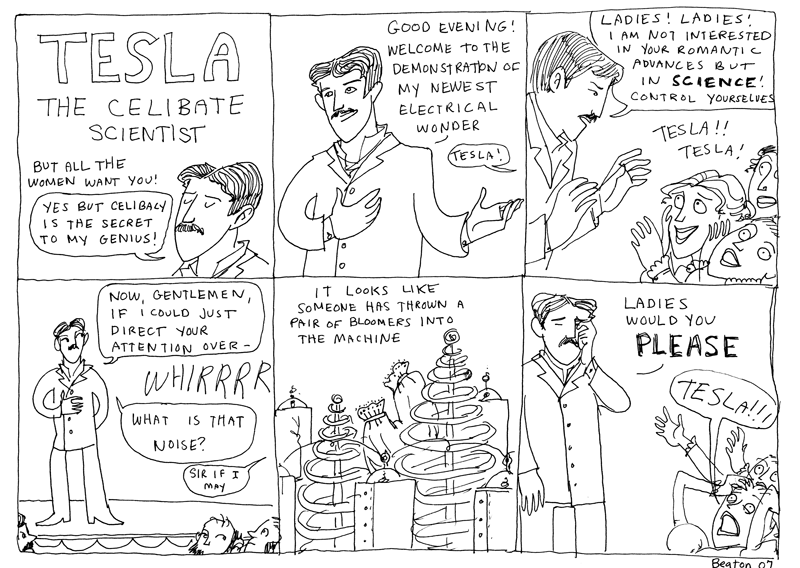 |
| See annotation here below the comic |

 |
| See Beaton's notes here below the comic |

But, you'll be glad to know that while it'd be awfully nice for you to buy this book and support Beaton, you can read all her comics online for free!
If you're interested in viewing them by topic, you can click here and choose strips accordingly. Or, you can read them in the order they were released by viewing the chronological archives.
After a couple of
How best (I think) to read Hark! AVagrant! on your computer (and iPad!) with Google Reader:
[1] Go to http://www.google.com/reader
[2] Log in with your Google username and password.

[3] On the top left corner, click on Subscribe and type in http://www.harkavagrant.com. Click Add.

[4] Now, Hark! A Vagrant should appear on your main page. Click on it.

[5] Go to Feed Settings... at the top of the page, and click on View in Reader Play.

[6] The window should now appear with a black background, and the comic will likely appear zoomed out. At the bottom of the window is a side scrolling row, which gives previews of all Beaton's posts in reverse chronological order.

However, if you leave the reader in this setting, the comic is too small to read! Do not fret, however! This probably can be easily solved.
[7] To make viewing easier (why waste time clicking when you could be reading?!), click on the Book icon on the left hand of the screen (see rectangular figure outlined in pink above). At this point, each comic will fill the width of the screen, giving you a more readable comic.
Update: After experimenting with Google Reader some more, I have found out what exactly the icons do. The Book icon shows the scrolling row at the bottom of the page. Clicking it will either open or close that row. The Eye icon zooms in on the strip. This is what makes the image fit the width of the screen.
To make the viewing experience even more whiz-bang-wow, go to View > Enter Full Screen (depending on your browser, the exact steps may vary. I use Chrome, so those are the menu options I have.)

In this new format, you can easily scroll up and down along the strip. Then, after you've finished reading the comic and the commentary that follows, you can click on the right hand arrow to move to the next strip. It's so easy!
 |
| Look how nice and big it is! A simple scroll can move us down the page. |
 |
| Ta-da! Scrolling! |
 |
| Finished with this first comic? All you gotta do is click on the right hand arrow... |
 |
| ...and now you've quickly jumped to the next comic! |
[8] And for those of you with an iPad, reading Beaton's comic is even easier than doing it on your computer.
Update: After playing around, I've learned that Google Reader only shows the last 10 entries for the site. This isn't that fun. The other trouble is that using Google Reader on the iPad is actually slightly problematic. A simple swipe left or right (even one that's tiny!) will move you between comics. Your best bet for reading the comic on you iPad is simple to visit the site URL in Safari.
With that, I'd advise to disregard the directions below. However, there are some links to interviews at the bottom of the post! Skip down to check them out!
All you have to do is log in to Google Reader (http://www.google.com/reader) in Safari, and the comics fit the width of the screen, and you easily scroll down to read more. When you finish the strip, you simply
 |
| Open Safari. Log in to Google Reader on your iPad |
 |
| Click on any of the posts. |
 |
| Enjoy current comic, and then tap on Next Item to move to the next comic. |
 |
| And voila! You can continue your uninterrupted stream of comic goodness. |
And that's it! Now you can enjoy Beaton's comics with the greatest of ease on your computer's browser or your iPad.
The Sound of Young America
